How can we help?
Detailed guides for releasing music, managing your catalog, understanding delivery, setting up splits, tracking royalties, and operating your NORTH account.
FOR INDEPENDENT
ARTISTS

12 guides for “analytics”
Streams and analytics versus earnings
Performance analytics and financial statements are related but arrive on different schedules.
Analytics & reports · 6 min readHow analytics and reports work
Use NORTH to understand streams, downloads, saves, platforms, releases, tracks, and markets.
Analytics & reports · 6 min readView analytics by market
Understand where reported listening activity is coming from geographically.
Analytics & reports · 6 min readView analytics by release
See which releases are producing the strongest reported activity.
Analytics & reports · 6 min readView analytics by store
Compare reported performance across supported streaming and download partners.
Analytics & reports · 6 min readView analytics by track
Compare individual recordings across your catalog.
Analytics & reports · 6 min readWhy a teammate may see different analytics
Workspace permissions and catalog scope can limit the data visible to a team member.
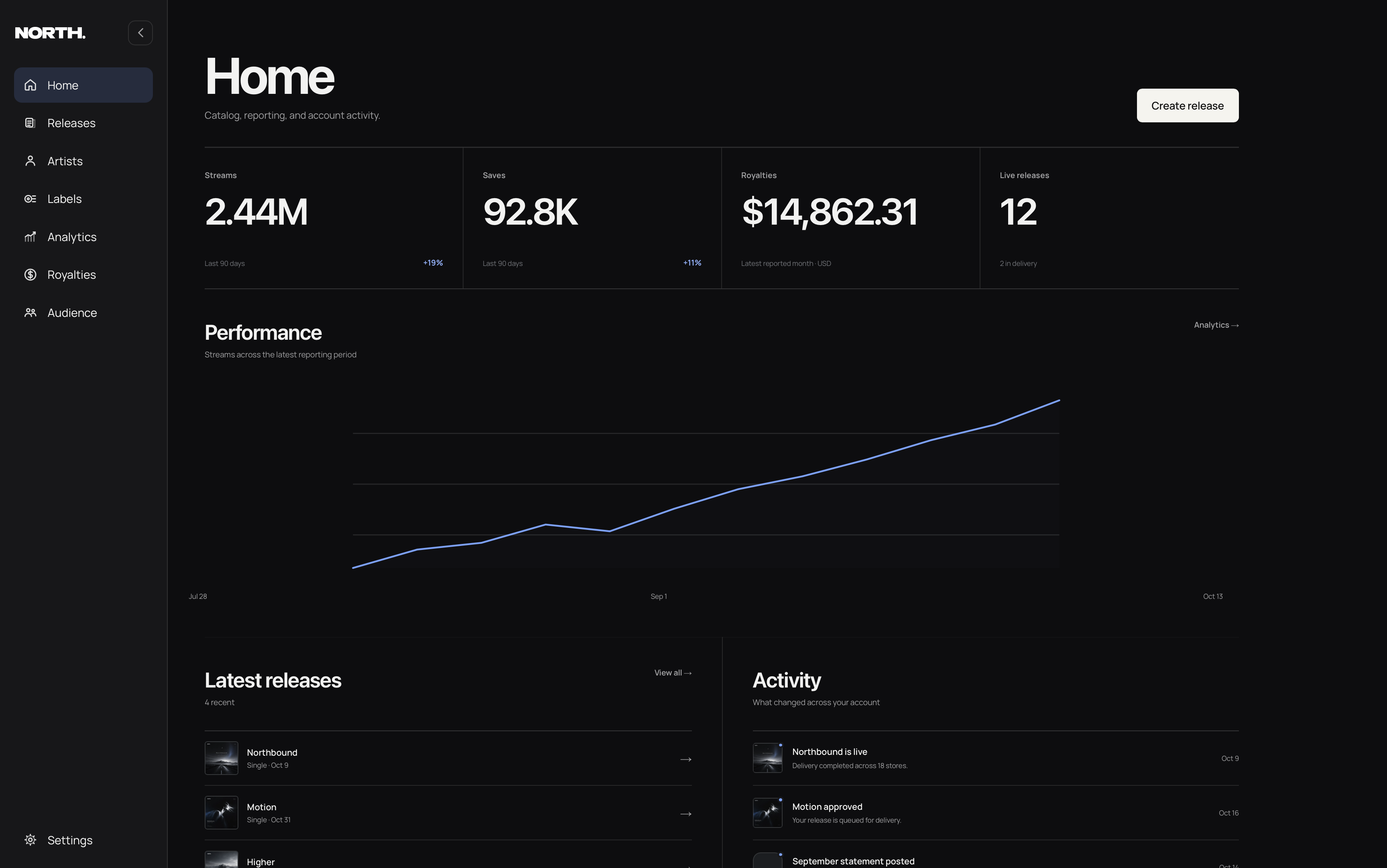
Analytics & reports · 6 min readA tour of the NORTH dashboard
Learn where releases, artists, labels, analytics, royalties, audience data, and settings live.
Getting started · 7 min readRun a label workspace
Use one workspace for catalog, delivery, analytics, royalties, and team access across a roster.
Label management · 7 min readLimit a teammate to selected artists or labels
Scope access so a teammate works only with the catalog they are responsible for.
Teams & permissions · 6 min readWhat NORTH is and how distribution works
A complete overview of how NORTH moves a release from your workspace to stores and keeps reporting connected afterward.
Getting started · 6 min readWhy earnings are not real-time
Stores report revenue on their own accounting schedules, so earnings appear later than streams.
Earnings & payouts · 6 min readBrowse by category
Everything from your first upload through reporting and payouts.
Getting started
Set up your workspace, understand NORTH, and prepare your first release.
6 guidesReleases
Create, submit, schedule, update, and manage releases from draft through live.
10 guidesAudio & metadata
Prepare audio, track information, contributors, credits, genres, and identifiers.
8 guidesArtwork & content rules
Understand cover art, rights, explicit content, samples, covers, and content eligibility.
7 guidesDelivery & store statuses
Follow review, delivery, live status, store processing, updates, and takedowns.
7 guidesRoyalties & splits
Set up release splits, add collaborators, accept allocations, and understand royalty ownership.
8 guidesEarnings & payouts
Read statements, understand reporting periods, complete payment setup, and receive payouts.
7 guidesAnalytics & reports
Read performance data by release, track, store, market, audience, and reporting period.
7 guidesProfiles & artist pages
Create artist records, connect platform profiles, and keep identity data consistent.
6 guidesTeams & permissions
Invite teammates, assign access, restrict catalog scope, and manage workspace permissions.
6 guidesLabel management
Manage label identity, catalog ownership, roster organization, and release attribution.
5 guidesSmart links & promo tools
Create release links, pre-release pages, store destinations, and promotional entry points.
5 guidesRights, claims & disputes
Understand ownership, licensing, Content ID, claims, disputes, and rights documentation.
5 guidesAccount & workspace
Manage account security, workspace settings, profile information, notifications, and access.
5 guidesPolicies & guidelines
Review platform rules, distribution requirements, prohibited content, and legal terms.
5 guidesStart here
The guides that explain the core NORTH workflow in the most detail.
What NORTH is and how distribution works
A complete overview of how NORTH moves a release from your workspace to stores and keeps reporting connected afterward.
Getting started · 6 min readYour first release checklist
Everything to have ready before you begin building your first release.
Getting started · 7 min readCreating your first release
Build a release from metadata through tracks, stores, review, and submission.
Releases · 7 min readUpload requirements for audio, artwork, and metadata
Prepare files and release information so the builder can validate them cleanly.
Audio & metadata · 6 min readHow review and delivery work
Understand what happens after you submit a release to NORTH.
Delivery & store statuses · 6 min readUnderstanding royalties, earnings, and splits
See how NORTH keeps the release royalty allocation connected to the catalog and reporting.
Royalties & splits · 7 min readHow analytics and reports work
Use NORTH to understand streams, downloads, saves, platforms, releases, tracks, and markets.
Analytics & reports · 6 min readManaging your artist profiles
Keep artist identities and connected store profile IDs organized inside NORTH.
Profiles & artist pages · 6 min readTalk to NORTH support.
Send the release title, the action you were trying to complete, the visible status or error, and any non-sensitive screenshots that help explain the problem.